Authenticating client requests
This chapter contains information about how Fire Arrow authenticates requests and an introduction to the role system.
Sending an authentication token
Fire Arrow accepts authentication tokens as Bearer tokens in the HTTP Authorization header.
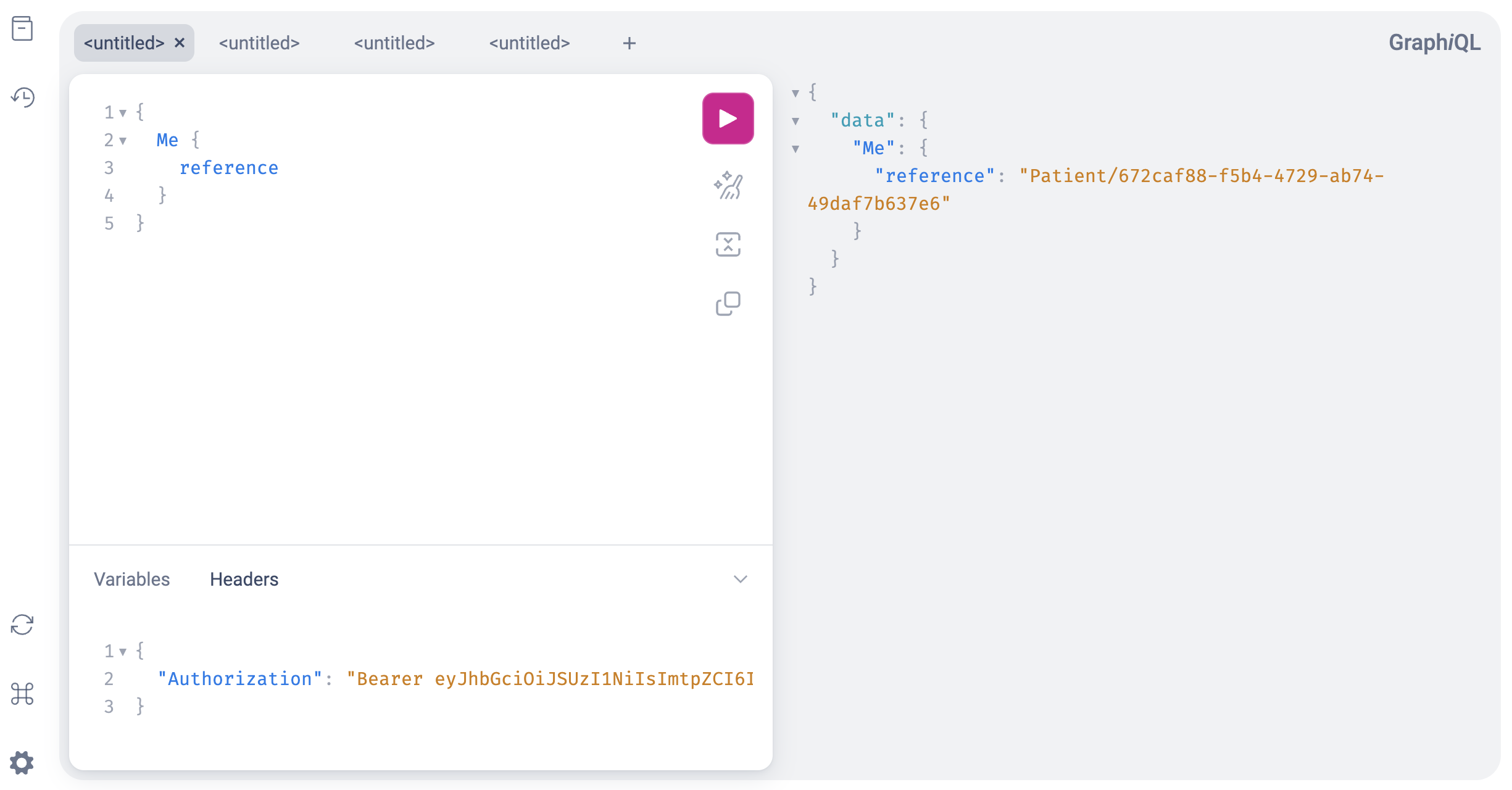
The Me query returns the client's detected identity (more on that below). If the query returns null, the authentication token is either invalid or doesn't contain enough information to determine the client's identity. If Fire Arrow was able to decode and process the token, it returns a reference to the client's identity. In the screenshot above, the client's identity is Patient/672caf88-f5b4-4729-ab74-49daf7b637e6.
Required configuration
The file config.json supports an auth section that contains all relevant settings.
{
    // ...
    "auth": {
        "systems": [
            {
                "type": "azure_identity",
                "parameters": {
                    "tenant_id": "8a0d55a8-3deb-40a8-b5b4-e598f9448aef"
                }
            },
            {
                "type": "oauth",
                "parameters": {
                    "identifier": "Azure B2C",
                    "oidc_url": "https://login.microsoftonline.com/1234-5678-9765-4567/v2.0/.well-known/openid-configuration",
                    "entity_type_claim": "extension_entityType",
                    "entity_id_claim": "extension_entityId"
                }
            }
        ],
        "auto_create_entity": true
    },
    // ...
}
Fire Arrow supports an arbitrary number of authentication strategies, which are listed in auth.systems. Every incoming request will be checked whether it can be authenticated with one of the listed systems. Systems will be tried in the order they appear in the configuration file.
When an authentication system can authenticate a request, the client's identity will be determined based on the supplied token and system-specific logic.
auto_create_entity determines if Fire Arrow will automatically create a corresponding FHIR resource for the client's identity. Example: Fire Arrow determines that the client has the identity Patient/12345 but no patient with that ID exists in the FHIR server. If auto_create_entity is set to true, Fire Arrow will automatically create an empty patient resource.
Understanding Fire Arrow's identity approach
Fire Arrow uses data stored in the FHIR backend to manage client identities. This allows managing medical data and content as well as all identities and access rights in the same place, using the same protocols and data structures.
Fire Arrow's supported roles match the primary actors in the FHIR data model:
Patientrepresents an individual or animal receiving care and is modeled through a FHIR resource of type Patient.Practitionerrepresents an individual providing care and is modeled through a FHIR resource of type Practitioner.RelatedPersonrepresents an individual related to a patient and is modeled through a FHIR resource of type RelatedPerson.Devicerepresents a machine or other equipment that needs access to health data or generates data and is modeled through a FHIR resource of type Device.Publicis a fallback role that is applied if the client could not be authenticated. This role can be used to define access rights for content that is meant to be public.
The diagram above shows how a client with claims in its authentication token is associated with a FHIR resource in the FHIR database. It is important to understand that the client assumes the identity of the referenced FHIR resource and thus "becomes" that FHIR resource.
The configuration values entity_type_claim and entity_id_claim tell Fire Arrow which claims to use in the incoming token to map the client to a FHIR entity.
Working with authentication claims
Decoupling the authentication service from the FHIR implementation is one of Fire Arrow's design goals. This allows Fire Arrow to use arbitrary authentication services for the same FHIR database and also doesn't require service-specific authentication information (such as a Google user ID) to be stored in the FHIR database.
This design makes the authentication token the primary information bridge between the authentication service and Fire Arrow. The authentication token needs to transport enough information so that Fire Arrow can retrieve the client's identity from the database. The two key pieces of information are the client's entity type (a FHIR resource that corresponds to the client's role, such as Patient, Practitioner, etc.) and the client's entity ID (the resource ID for the client's entity type).
Generating the entity type claim
It is easiest to inject the entity type claim into a client-specific authentication flow. Applications that support multiple client roles typically use different sign-in flows for each role. For example, a patient logs into a patient-specific mobile app whereas a practitioner uses a hospital web app, each having their own sign-in flow.
When setting up the sign-in flow for a client, it is possible to hard-code the entity type claim. Using Azure B2C as an example, it is possible to use a post-sign-in / pre-token-generation API call that injects a fixed entity type claim.
Fire Arrow expects this value in the claim specified by the configuration setting entity_type_claim.
Example:
- An authentication flow is used to authenticate patients.
- The setting
entity_type_claimis set toextension_entityType. - Then the authentication token claim
extension_entityTypemust be set toPatient.
Generating the entity ID claim
For setups that require the same user object in the same authentication service to always be the same FHIR resource, Fire Arrow supports specifying the entity ID in the authentication claim. This claim then needs to be retrieved from the authentication system's user record.
The benefit of this setting is a clear association between a user object in the authentication service and a resource in the FHIR database. However, it comes at the expense of having to synchronize user-specific data between both services.
If it is not desirable to do so, the OAuth authentication system supports looking up a client's identity via their email address or phone number.
Automatic entity creation
Many systems have a requirement for self-service user registration but usually it is not desirable to allow clients to create new user entities themselves. For example, a patient-specific hospital app to submit or browse a patient's medical data shall have read access to its own patient record but shall not be able to create arbitrary patient resources itself.
Fire Arrow supports this scenario through the flag auto_create_entity. If set to true, Fire Arrow will automatically create a FHIR resource matching the client's identity if none is found.
- For situations where both the claims
entity_type_claimandentity_id_claimare contained in the authentication token, Fire Arrow will attempt to create a FHIR resource with the matching ID. - For situations where fallback search is used, Fire Arrow will attempt to create a FHIR resource with the matching fallback parameter (
emailin the default settings).
Example:
- A client with the email address
foo@bar.comand entity typePatientmakes a request. - Fire Arrow tries to find a matching FHIR Patient resource.
- If a
Patientresource with emailfoo@bar.comis found, Fire Arrow uses this resource as the client's identity. - If no
Patientresource with emailfoo@bar.comis found, Fire Arrow will create a newPatientresource, set the email field tofoo@bar.comand use the new resource's ID as the client's identity.
Note: While Fire Arrow is generally stateless and can scale horizontally, this feature introduces a potential race condition. If a client makes multiple simultaneous requests and isn't known in the system yet, automatic entity creation may lead to multiple entities being created for the same client. Fire Arrow acquires an internal mutex to ensure that this scenario is unlikely but currently doesn't track multiple independent instances of itself running in parallel. Acquiring a global lock between multiple independent instances is tracked as feature request.
Client implementers are advised to execute the Me query during client startup and wait until this query is completed before making any further requests. Once this query returns a result, it is safe to send as many requests in parallel as desired.
Troubleshooting
If something is not correct in the authentication setup, Fire Arrow will often return a GraphQL error message with the sole content Unauthorized. The error message is not very helpful to debug the actual problem. These steps can be taken to find the problem and fix it:
- Acquire an authentication token with the client receiving the error message and decode it. (for example via jwt.ms)
- Check that the signature is correct and the issuer in the token matches the issuer in
config.json. - Try accessing the JWKS URL from
config.jsonin a browser and verify that the JWKS is accessible. - Verify that the token contains entity type and entity ID claims as configured in
config.json. - Try to retrieve the corresponding resource from the FHIR server. For example, if entity type is set to
Patientand entity ID is set to12345, try to retrievePatient/12345from the FHIR server. - Execute
query { Me { reference } }as the only query and verify that you get a non-null response. The returned reference needs to match the entity specified in the token. - Check that no error messages are contained in Fire Arrow's logs and that Fire Arrow makes successful queries to the FHIR backend.
- If
Medoesn't work, repeat the steps above until the issue is found. - If
Meworks but other queries / mutations do not, verify thatconfig.jsoncontains the required request validation strategy.